Jupyter to LLM Extractor
A Chrome extension that extracts content from Jupyter notebooks for use with large language models.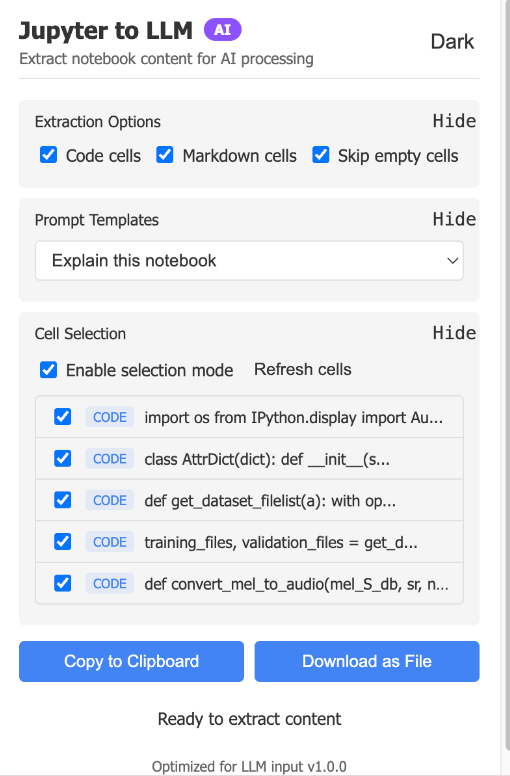
Features
- Extract both code and markdown cells
- Filter out empty cells
- Apply prompt templates
- Select specific cells for extraction
- Copy to clipboard or download as text file
- Dark mode support
Installation
Note: This extension is not yet available on the Chrome Web Store.
Manual Installation (Currently the only option)
- Download the repository as a ZIP file and extract it
- Open Chrome and navigate to
chrome://extensions/ - Enable “Developer mode” (toggle in the top-right corner)
- Click “Load unpacked” and select the extracted folder
Usage
- Navigate to any Jupyter notebook
- Click the extension icon in your toolbar
- Choose your extraction options:
- Select which cell types to include
- Choose a prompt template (optional)
- Select specific cells (optional)
- Click “Copy to Clipboard” or “Download as File”
Development
The extension consists of four main components:
popup.html/js: User interfacecontent.js: Extracts notebook content from the pagebackground.js: Handles file downloadsmanifest.json: Extension configuration
Privacy Note
All content extraction happens locally in your browser. No notebook content is ever sent to any server. The extension only requires permissions to access the current tab and handle downloads.
Source Code
The complete source code is available on GitHub. Contributions, issues, and feature requests are welcome.